 Written by
 I don’t know you, but I like to work with the PDF version of the documentation. The problem is that the PDF files have names that are not very useful (or do you remember that the SQL Reference Guide is named e10592.pdf?). Hence, when I download the documentation, I like to store each PDF with its title as a file name. In addition, for easy access, I put them under the My Documents menu. The following image shows how it looks like on my laptop.
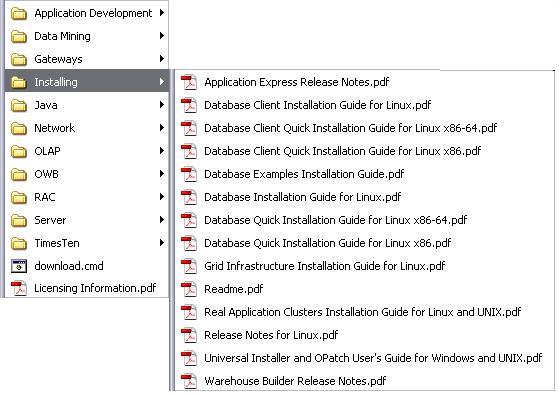
It goes without saying that doing that for the 148 files of the documentation library is not only boring, but it is also very time consuming. Hence, I did it in the following way:
- opened the master book list
- extracted the HTML code associated to the table containing the list of PDF files
- applied a small XSL transformation to generate a script that downloads all files
- executed the script
In this way I just had to start the script and about 10 minutes later the whole documentation library was stored locally. Note that with such a script it is also very simple to periodically re-download all files. Just to keep them up-to-date…
If you think that it is something useful for you, feel free to download it by clicking the following link: download.cmd. The only requirement is that wget must be installed on your system. For me GNU Wget works fine.
Update (6:16 pm): a colleague of mine, Dani Rey, sent me a KSH version of the script. Feel free to download this one as well: download.ksh. Thank you Dani!
Update 2011-04-01: this post provides scripts to download the documentation of 10.2, 11.1 and 11.2.
Update 2017-02-01: I refreshed the scripts.
Update 2020-03-15: I removed the link to the download.ksh script.
Christian, Thanks, this is great. If you are prepared to share your XSL code, I would create a similar script for 10g2 and then share it with others.
Dani’s script has a minor problem – the word “Reference” has been corrupted to “Refemvce”. Thus many titles of reference documents are corrupted. A corrected version can be found here
Hi Brett
Thank you for the feedback! I corrected the script. BTW, tomorrow I should be able to post the XLS code… So, stay tuned ;-)
Cheers,
Chris
Ciao Chris/Dani,
Cool stuff, thanks! Runs perfectly on my Mac ;-)
this is pretty cool and useful.
thanks for the sharing.
For the people like Brett that are interested in doing some similar with other versions of the documentation, here some details on how I generated the script:
1) opened the master book list in Firefox
2) selected the table containing the links to the PDF and executed “View Selection Source”
3) copied/pasted the table body in a file named doc1.xml
4) removed some garbage with the following command: grep -e tbody -e to_pdf doc1.xml | sed ‘s/%2F/\//’ > doc2.xml
5) applied the XSL transformation that you find below to the file named doc2.xml (I used XML Notepad 2007 for that)
6) copied/pasted the output in another file and did some editing (e.g. removed duplicates of mkdir, changed the name of 3 files having a too long name…)
HTH
Chris
<?xml version="1.0" encoding="UTF-8" standalone="yes"?> <xsl:stylesheet version="1.0" xmlns:xsl="http://www.w3.org/1999/XSL/Transform"> <xsl:output method="html" encoding="UTF-8"/> <xsl:template match="/tbody"> <xsl:for-each select="a"> mkdirI have created a shell script to download and rename all the 10g2 PDF docs – it’s available here (tested on Redhat Linux).
Thanks for the XSL tutorial Chris ;-) It’s certainly a lot easier than trying to remember the arcane syntax of regexps!
[…] to start looking into the details. Christian Antognini’s Deferred Segment Creation and his Script to Download 11gR2 Documentation are useful articles to get going. If you need help upgrading, read Get Upgrading: Steps To Upgrade […]
very useful, thanks for the sharing.